在LINUX下有什么办法防止用户使用nmap -PS扫描时主机显示为host up状态

 请教高手,在LINUX下有什么办法防止用户使用nmap -SP扫描时主机显示为host up状态?谢谢
19:16:31
【冒泡】fred@深圳 2015/3/16 19:16:31

不允许ping,关闭全部端口应该可以吧

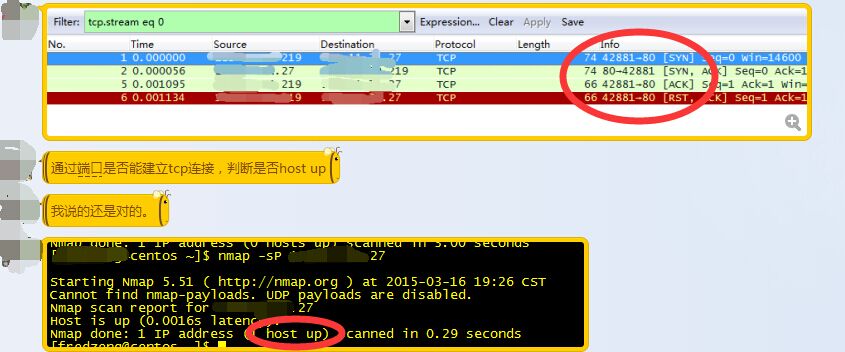
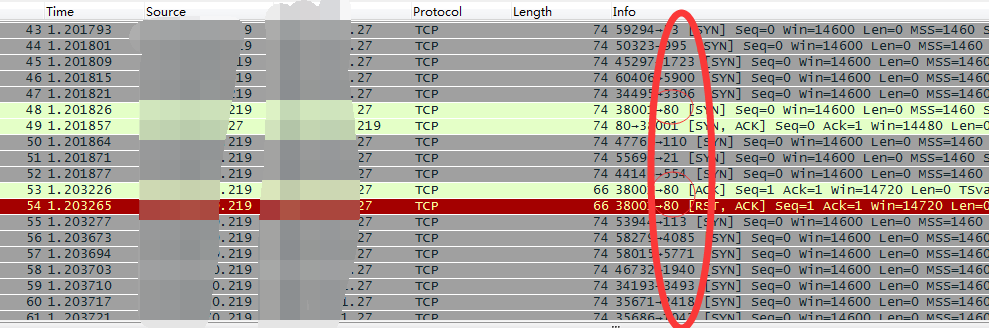
详细看看nmap -SP测试结果,通过tcpdump抓包发现,建立tcp连接后nmap就关闭连接了。

QQ图片20150316193330.jpg

 #nmap -Pn xxx.xxx.71.27 

我们看到服务器xxx.xxx.71.27只有80端口响应了,因此可以判断xxx.xxx.71.27 host up。

QQ图片20150316194947.png

Linux 免重新编译php安装扩展(示范zip安装)

PHPExcel读取Excel表格的时候报ZipArchive library is not enabled错误. 缺少zip 模块. 在Linux下没有zip.so这个模块文件(有也不会起作用的),所以需要重新编译一下php的增加zip模块。

1)重新到原来编译php的目录

#cd php-5.3.6/ext/zip

先执行phpize

# /usr/local/php/bin/phpize

返回:Configuring for:
PHP Api Version:         20090626
Zend Module Api No:      20090626
Zend Extension Api No:   220090626

2)运行了这个zip目录下会自动生成几个文件,其中包括configure

  1. #./configure  –enable-zip –with-php-config=/usr/local/php/bin/php-config 
  2. # make
  3. # make install

3)安装完成后修改一下php.ini

  1. # vim /usr/local/php/etc/php.ini

加入

  1. extension=/usr/local/php/lib/php/extensions/no-debug-non-zts-20060613/zip.so   (路径可能不太一样,参考make install 返回路径)
  2. 然后同样在php.ini文件中,将 zlib.output_compression = Off 改为 zlib.output_compression = On .

之后重启/etc/init.d/httpd restart

Installing Redmine3 项目管理工具Redmine安装

Installing Redmine3 项目管理工具Redmine安装In

stalling Redmine

This is the installation documentation for Redmine 1.4.0 and higher. You can still read the document for 1.3.x here.

Requirements

Operating system

Redmine should run on most Unix, Linux, MacMac Server and Windows systems as long as Ruby is available on this platform. See specific installation HowTos here.

Ruby interpreter

The required Ruby versions for a given Redmine version is:

Redmine version Supported Ruby versions Rails version used
current trunk ruby 1.9.3, 2.0.01, 2.1, 2.2 Rails 4.2
trunk < r13482 ruby 1.8.72, 1.9.2, 1.9.3, 2.0.01, 2.1, jruby-1.7.6 Rails 3.2
3.0 ruby 1.9.3, 2.0.01, 2.1, 2.2 Rails 4.2
2.6 ruby 1.8.72, 1.9.2, 1.9.3, 2.0.01, 2.1, jruby-1.7.6 Rails 3.2

Redmine 2.x does not support Ruby 2.2. Redmine 3.0 supports Ruby 2.2 (#18947).

MRI 1.9.3p327 contains a bug breaking plugin loading under Windows which 1.9.3p194 or 1.9.3p392 haven’t.

1 At time of writing (3/19/2013), SQL Server support is reported broken with ruby 2.0.0 under Windows because of a database adapter gem incompatibility

2 Ruby MRI 1.8.7 support has reached its EOL and its use is discouraged. See Important: Ruby 1.8.7 out of support and #14371 for additional information.

Supported database back-ends

  • MySQL 5.0 or higher

    • make sure to install the C bindings for Ruby that dramatically improve performance. You can get them by running gem install mysql2.
    • Redmine 2.x is not compatible with mysql 5.7.3 (#17460). Il will be supported by Redmine 3.
  • PostgreSQL 8.2 or higher

    • make sure your database datestyle is set to ISO (Postgresql default setting). You can set it using: ALTER DATABASE "redmine_db" SET datestyle="ISO,MDY";
    • some bugs in PostgreSQL 8.4.0 and 8.4.1 affect Redmine behavior (#4259#4314), they are fixed in PostgreSQL 8.4.2
  • Microsoft SQL Server

    • Redmine 2.x: 2008 or higher (since Redmine 2.3.0)
    • Redmine 3.x: 2012 or higher
  • SQLite 3 (not for multi-user production use!)

Optional components

  • SCM binaries (eg. svn), for repository browsing (must be available in your PATH). See RedmineRepositories for SCM compatibility and requirements.
  • ImageMagick (to enable Gantt export to PNG image and thumbnails generation).
  • Ruby OpenID Library (to enable OpenID support). Version 2 or greater is required.

Redmine Version

It is recommended that the majority of users install the proper point releases of redmine. Redmine currently releases a new version every 6 months, and these releases are considered very usable and stable. It is not recommended to install redmine from trunk, unless you are deeply familiar with Ruby on Rails and keep up with the changes – Trunk does break from time-to-time.

Installation procedure

Step 1 – Redmine application

Get the Redmine source code by either downloading a packaged release or checking out the code repository.

See the download page for details.

Step 2 – Create an empty database and accompanying user

Redmine database user will be named redmine hereafter but it can be changed to anything else.

MySQL

CREATE DATABASE redmine CHARACTER SET utf8; CREATE USER 'redmine'@'localhost' IDENTIFIED BY 'my_password'; GRANT ALL PRIVILEGES ON redmine.* TO 'redmine'@'localhost'; 

For versions of MySQL prior to 5.0.2 – skip the ‘create user’ step and instead:

GRANT ALL PRIVILEGES ON redmine.* TO 'redmine'@'localhost' IDENTIFIED BY 'my_password'; 

PostgreSQL

CREATE ROLE redmine LOGIN ENCRYPTED PASSWORD 'my_password' NOINHERIT VALID UNTIL 'infinity'; CREATE DATABASE redmine WITH ENCODING='UTF8' OWNER=redmine; 

SQL Server

The database, login and user can be created within SQL Server Management Studio with a few clicks.

If you prefer the command line option with SQLCMD, here’s some basic example:

Step 3 – Database connection configuration

Copy config/database.yml.example to config/database.yml and edit this file in order to configure your database settings for “production” environment.

Example for a MySQL database using ruby 1.8 or jruby:

production: adapter: mysql database: redmine host: localhost username: redmine password: my_password 

Example for a MySQL database using ruby 1.9 (adapter must be set to mysql2):

production: adapter: mysql2 database: redmine host: localhost username: redmine password: my_password 

If your server is not running on the standard port (3306), use this configuration instead:

production: adapter: mysql database: redmine host: localhost port: 3307 username: redmine password: my_password 

Example for a PostgreSQL database (default port):

production: adapter: postgresql database: <your_database_name> host: <postgres_host> username: <postgres_user> password: <postgres_user_password> encoding: utf8 schema_search_path: <database_schema> (default - public) 

Example for a SQL Server database (default host localhost, default port 1433):

production: adapter: sqlserver database: redmine username: redmine # should match the database user name password: redminepassword # should match the login password 

Step 4 – Dependencies installation

Redmine uses Bundler to manage gems dependencies.

You need to install Bundler first:

gem install bundler

Then you can install all the gems required by Redmine using the following command:

bundle install --without development test

Optional dependencies

RMagick (allows the use of ImageMagick to manipulate images for PDF and PNG export)

If ImageMagick is not installed on your system, you should skip the installation of the rmagick gem using:

bundle install --without development test rmagick

If you have trouble installing rmagick on Windows, refer to this HowTo.

Database adapters

Redmine automatically installs the adapter gems required by your database configuration by reading it from the config/database.yml file (eg. if you configured only a connection using the mysql2 adapter, then only the mysql2 gem will be installed).

Don’t forget to re-run bundle install --without development test ... after adding or removing adapters in the config/database.yml file!

Additional dependencies (Gemfile.local)

If you need to load gems that are not required by Redmine core (eg. Puma, fcgi), create a file named Gemfile.local at the root of your redmine directory. It will be loaded automatically when running bundle install.

Example:

# Gemfile.local
gem 'puma'

这里有提示,大致意思是说mysql-adapter有问题。 然后看了一下配置database.yml文件,确定adapter是mysql2,然后gem安装mysql2

$ gem install mysql2

Step 5 – Session store secret generation

This step generates a random key used by Rails to encode cookies storing session data thus preventing their tampering.
Generating a new secret token invalidates all existing sessions after restart.

  • with Redmine 1.4.x:
rake generate_session_store
  • with Redmine 2.x:
rake generate_secret_token

Step 6 – Database schema objects creation

Create the database structure, by running the following command under the application root directory:

RAILS_ENV=production rake db:migrate

Windows syntax:

set RAILS_ENV=production
rake db:migrate

It will create tables by running all migrations one by one then create the set of the permissions and the application administrator account, named admin.


Ubuntu troubleshooting:

If you get this error with Ubuntu:

Rake aborted!
no such file to load -- net/https

Then you need to install libopenssl-ruby1.8 just like this: apt-get install libopenssl-ruby1.8.

Step 7 – Database default data set

Insert default configuration data in database, by running the following command:

RAILS_ENV=production rake redmine:load_default_data

Redmine will prompt you for the data set language that should be loaded; you can also define the REDMINE_LANG environment variable before running the command to a value which will be automatically and silently picked up by the task.

E.g.:

Unices:

RAILS_ENV=production REDMINE_LANG=fr rake redmine:load_default_data

Windows:

set RAILS_ENV=production
set REDMINE_LANG=fr
rake redmine:load_default_data

Step 8 – File system permissions

NB: Windows users can skip this section.

The user account running the application must have write permission on the following subdirectories:

  1. files (storage of attachments)
  2. log (application log file production.log)
  3. tmp and tmp/pdf (create these ones if not present, used to generate PDF documents among other things)
  4. public/plugin_assets (assets of plugins)

E.g., assuming you run the application with a redmine user account:

mkdir -p tmp tmp/pdf public/plugin_assets
sudo chown -R redmine:redmine files log tmp public/plugin_assets
sudo chmod -R 755 files log tmp public/plugin_assets

Step 9 – Test the installation

Test the installation by running WEBrick web server:

  • with Redmine 1.4.x:
ruby script/server webrick -e production
  • with Redmine 2.x:
ruby script/rails server webrick -e production

Once WEBrick has started, point your browser to http://localhost:3000/. You should now see the application welcome page.

Note: Webrick is not suitable for production use, please only use webrick for testing that the installation up to this point is functional. Use one of the many other guides in this wiki to setup redmine to use either Passenger (aka mod_rails), FCGI or a Rack server (Unicorn, Thin, Puma, hellip;) to serve up your redmine.

Step 10 – Logging into the application

Use default administrator account to log in:

  • login: admin
  • password: admin

You can go to Administration menu and choose Settings to modify most of the application settings.

Configuration

Redmine settings are defined in a file named config/configuration.yml.

If you need to override default application settings, simply copy config/configuration.yml.example to config/configuration.yml and edit the new file; the file is well commented by itself, so you should have a look at it.

These settings may be defined per Rails environment (production/development/test).


Important

 : don’t forget to restart the application after any change.

Email / SMTP server settings

Email configuration is described in a dedicated page.

SCM settings

This configuration section allows you to:

  • override default commands names if the SCM binaries present in the PATH variable doesn’t use the standard name (Windows .bat/.cmd names won’t work)
  • specify the full path to the binary

Examples (with Subversion):

Command name override:

scm_subversion_command: "svn_replacement.exe"

Absolute path:

scm_subversion_command: "C:\Program Files\Subversion\bin\svn.exe"

Attachment storage settings

You can set a path where Redmine attachments will be stored which is different from the default ‘files’ directory of your Redmine instance using theattachments_storage_path setting.

Examples:

attachments_storage_path: /var/redmine/files
attachments_storage_path: D:/redmine/files

Logging configuration

Redmine defaults to a log level of :info, writing to the log subdirectory. Depending on site usage, this can be a lot of data so to avoid the contents of the logfile growing without bound, consider rotating them, either through a system utility like logrotate or via the config/additional_environment.rb file.

To use the latter, copy config/additional_environment.rb.example to config/additional_environment.rb and add the following lines. Note that the new logger defaults to a high log level and hence has to be explicitly set to info.

#Logger.new(PATH,NUM_FILES_TO_ROTATE,FILE_SIZE) config.logger = Logger.new('/path/to/logfile.log', 2, 1000000)
config.logger.level = Logger::INFO 

Backups

Redmine backups should include:

  • data (stored in your redmine database)
  • attachments (stored in the files directory of your Redmine install)

Here is a simple shell script that can be used for daily backups (assuming you’re using a mysql database):

# Database
/usr/bin/mysqldump -u <username> -p<password> <redmine_database> | gzip > /path/to/backup/db/redmine_`date +%y_%m_%d`.gz

# Attachments
rsync -a /path/to/redmine/files /path/to/backup/files

Notes on Linux/Unix installation

Be sure to disable security hardenning tools during the installation process if you run into bizarre permission problems. These problems are mostly silent and can be caused by tools like extended ACLs, SELinux, or AppArmor. There tools are mostly used in big companies with a strict security policy, default Linux/Unix distributions settings shouldn’t be a problem.

Notes on Windows installation

There is an prebuilt installer of Ruby MRI available from http://rubyinstaller.org.
After installing it, select Start Command Prompt with Ruby in the start menu.


Specifying the RAILS_ENV environment variable:

When running command as described in this guide, you have to set the RAILS_ENV environment variable using a separate command.

I.e. commands with the following syntaxes:

RAILS_ENV=production <any commmand>
<any commmand> RAILS_ENV=production

have to be turned into 2 subsequent commands:

set RAILS_ENV=production
<any commmand>


MySQL gem installation issue:

You may need to manually install the mysql gem using the following command:

gem install mysql

And in some case it is required to copy the libmysql.dll file in your ruby/bin directory.
Not all libmysql.dll are ok this seem to works http://instantrails.rubyforge.org/svn/trunk/InstantRails-win/InstantRails/mysql/bin/libmySQL.dll.

Important note for Win7 and later
On Win7 and later, localhost is commented out in the hosts file1 and IPV6 is the default2. As the mysql2 gem does no support IPV6 addresses3, a connection can’t be established and you get the error “Can't connect to MySQL server on 'localhost' (10061)“.
You can confirm this by pinging localhost, if ping targets “::1:” IPV6 is being used.


Workaround:


Replace localhost with 127.0.0.1 in database.yml.

1 http://serverfault.com/questions/4689/windows-7-localhost-name-resolution-is-handled-within-dns-itself-why

2 http://www.victor-ratajczyk.com/post/2012/02/25/mysql-fails-to-resolve-localhost-disable-ipv6-on-windows.aspx

3 https://github.com/brianmario/mysql2/issues/279

Alternative to manual installation

Some users may prefer to skip manual installation by using one of the third-party Redmine bundles on the download page.

腰椎小关节紊乱锻炼恢复方法

腰椎小关节紊乱康复锻炼方法


本法是笔者亲自体验发现的一个方法,

方法十分简单,

不花一分钱,

对身体无任何损害,

很可能为你尽快解除痛苦。

不久前,

由于一次劳动,

导致腰痛难忍,经医生检查确诊为腰椎间盘突出及腰椎小关节紊乱,其

中以后者为主。经过理疗、推拿按摩、贴敷各种膏药、口服壮腰建肾丸

等药,效果均不显著。后来自己突发奇想,做了几次下蹲运动,结果奇

迹发生了:两天见效,不到两周症状完全消失。具体做法是:


1

、自然站立,两腿分开与肩同宽,两手自然下垂,挺胸、抬头、

收腹,目视前方。


2

、下蹲:大约每分钟

30

——

40

次,下蹲时,两臂自然向前、向上

摆动至与眼同高,手心向下,下蹲到最低时,手臂上摆到最高位置(与

眼同高)

。下蹲的位置可根据个人年龄、体质情况决定,一般向下的幅

度在

20

——

30

厘米左右,幅度越大,运动强度越大;站起时,手臂随

之自然下垂摆动。依此反复下蹲——站起。大约做

200

——

300

次即可,

时间约

7

——

10

分钟。


坚持用本法锻炼,不仅可以治疗腰椎小关节紊乱,而且对身体的锻

炼效果也十分显著,各位不妨一试,相信您一定会尝到甜头的!


祝各位身体健康!

   脊椎小关节综合征又称脊椎小关节紊乱,系指脊椎小关节在扭转外力作用下,超出正常活动范围而发生侧向滑移,造成其周围韧带肌肉损伤和超出生理活动范围,且不能自行复位而导致脊椎功能障碍者。临床较为常见,本病的出现,既有脊椎结构上的内因,又有脊椎不能承受负荷失稳的外因。包括:颈椎小关节错位、胸椎小关节错位、腰椎小关节错位、骶髂关节错位。本病好发于青壮年,若治疗不当,或耽误治疗,可引起持续性的颈、胸、腰、骶部的疼痛。其中腰椎小关节错位又称腰椎滑膜嵌顿综合征最为常见及严重,另节叙述。本节主要讨论颈、胸及骶髂关节错位。


    本法是笔者亲自体验发现的一个方法,方法十分简单,不花一分钱,对身体无任何损害,很可能为你尽快解除痛苦。不久前,由于一次劳动,导致腰痛难忍,经医生检查确诊为腰椎间盘突出及腰椎小关节紊乱,其中以后者为主。经过理疗、推拿按摩、贴敷各种膏药、口服壮腰建肾丸等药,效果均不显著。后来自己突发奇想,做了几次下蹲运动,结果奇迹发生了:两天见效,不到两周症状完全消失。具体做法是:  
1、自然站立,两腿分开与肩同宽,两手自然下垂,挺胸、抬头、收腹,目视前方。  
2、下蹲:大约每分钟30——40次,下蹲时,两臂自然向前、向上摆动至与眼同高,手心向下,下蹲到最低时,手臂上摆到最高位置(与眼同高)。下蹲的位置可根据个人年龄、体质情况决定,一般向下的幅度在20——30厘米左右,幅度越大,运动强度越大;站起时,手臂随之自然下垂摆动。依此反复下蹲——站起。大约做200——300次即可,时间约7——10分钟。  
   坚持用本法锻炼,不仅可以治疗腰椎小关节紊乱,而且对身体的锻炼效果也十分显著,各位不妨一试,相信您一定会尝到甜头的! 

免费且开源的项目管理工具redmine3的安装和升级

Redmine

这是一款开源的、灵活的项目管理Web解决方案。使用Ruby on Rails框架编写的,支持跨平台和跨数据库。主要功能包括:

  • 灵活的项目控制;
  • 支持多个项目;
  • 灵活的问题追踪系统;
  • Gantt图表;
  • 新闻、文件/文档管理;
  • 电子邮件/心疼通知;
  • 实时追踪;
  • 每个项目论坛;
  • 每个项目Wiki;
  • 自定义字段条目时、问题、影虎以及项目;
  • SCM集成(CVS,SVN,Git,Mercurial,Darcs,Bazaar);
  • 支持多个LDAP验证;
  • 支持多语言;
  • 使用email创建问题;
  • 支持用户自定义注册;

  • 支持多种数据库。

免费且开源的项目管理工具redmine3的安装和升级

参考:

http://www.redmine.org/projects/redmine/wiki/RedmineInstall#Requirements

Redmine 3.0的需求:
current trunk	ruby 1.9.3, 2.0.01, 2.1, 2.2	Rails 4.2

1. 搭建redmine3环境

【安装软件包】
# yum install zlib-devel gcc gcc-c++ make autoconf curl-devel ImageMagick-devel mysql mysql-devel


【下载安装包,修改db和email的设置】
# tar zxvf redmine-3.0.0.tar.gz && cd redmine-3.0.0/config
# cp -a database.yml.example database.yml
# cp -a configuration.yml.example configuration.yml


【建立ruby2.2 + rails 4.2的环境】
# gpg --keyserver hkp://keys.gnupg.net --recv-keys 409B6B1796C275462A1703113804BB82D39DC0E3
# curl -sSL https://get.rvm.io | bash -s stable --ruby --rails               

重新登录一次:
$ ruby -v
ruby 2.2.0p0 (2014-12-25 revision 49005) [x86_64-linux]
$ rails -v
Rails 4.2.0


# rvm gemset list

gemsets for ruby-2.2.0 (found in /usr/local/rvm/gems/ruby-2.2.0)
=> (default)
   global

# cd /data/website/ ;mv redmine-3.0.0 redmine  【安装依赖包】
# ./bin/bundle install --without development test
--- bundle install的时候半天没有响应,具体可以用 gem install bundle -V 来查看执行过程。
如何更换:
$ gem sources --remove https://rubygems.org/ 
$ gem sources -a https://ruby.taobao.org/ 
$ gem sources -l
*** CURRENT SOURCES ***

https://ruby.taobao.org # 请确保只有 ruby.taobao.org $ gem install rails
# useradd -s /sbin/nologin -M -c "redmine" redmine
# chown -R redmine:redmine /data/website/redmine-3.0.0

若是全新安装:
【db】

mysql登录后,建立redmine数据库和用户:
# mysql -h x.x.x.x -P xxxx -uroot -p 
mysql> create database redmine character set utf8 collate utf8_bin;
mysql> create user ‘redmine‘@‘127.0.0.1‘ identified by ‘xxxxxx‘;
mysql> grant all privileges on redmine.* to ‘redmine‘@‘127.0.0.1‘;
mysql> exit;

# rake generate_secret_token
# RAILS_ENV=production rake db:migrate
# RAILS_ENV=production rake redmine:load_default_data
# mkdir -p tmp tmp/pdf public/plugin_assets
# chmod -R 755 files log tmp public/plugin_assets


若是升级:
【db】
备份数据库
检查db用户权限
命令行测试连接

执行:
# bundle exec rake generate_secret_token
# bundle exec rake db:migrate RAILS_ENV=production
若有插件:
# bundle exec rake redmine:plugins:migrate RAILS_ENV=production

# bundle exec rake tmp:cache:clear tmp:sessions:clear RAILS_ENV=production


启动服务:
# cd /data/website/redmine-3.0.0/
# ruby bin/rails server webrick -e production
也可以放入后台:
# nohup ruby bin/rails server webrick -e production >>/data/log/web/redmine/running_redmine.log 2>&1 &


默认管理员:admin, admin
访问http://IP:3000


2. 迁移redmine服务到nginx下
# yum install pcre pcre-devel
# wget http://nginx.org/download/nginx-1.6.2.tar.gz
# tar zxvf nginx-1.6.2.tar.gz -C /data/download/
# mkdir -p /var/cache/nginx/{client_temp,proxy_temp,fastcgi_temp,uwsgi_temp,scgi_temp}
# gem install passenger
# passenger -v
Phusion Passenger version 4.0.59

"Phusion Passenger" is a trademark of Hongli Lai & Ninh Bui.

注:若遇到gem install passenger不能生效的问题,可能是ruby的仓库被GFW了,此时,先安装fastthread可以解决问题:
# gem install fastthread
# gem install passenger

安装:
# passenger-install-nginx-module

Enter your choice (1 or 2) or press Ctrl-C to abort: 2

--------------------------------------------

Where is your Nginx source code located?

Please specify the directory: /data/download/nginx-1.6.2

--------------------------------------------

Where do you want to install Nginx to?

Please specify a prefix directory [/opt/nginx]: /etc/nginx

--------------------------------------------

Extra Nginx configure options

If you want to pass extra arguments to the Nginx ‘configure‘ script, then
please specify them. If not, then specify nothing and press Enter.

If you specify nothing then the ‘configure‘ script will be run as follows:

  sh ./configure --prefix=‘/etc/nginx‘ --with-http_ssl_module --with-http_gzip_static_module \
 --with-http_stub_status_module --with-cc-opt=‘-Wno-error‘\
 --add-module=‘/usr/local/rvm/gems/ruby-2.2.0/gems/passenger-4.0.59/ext/nginx‘

Extra arguments to pass to configure script: --sbin-path=/usr/sbin/nginx --conf-path=/etc/nginx/nginx.conf \
--error-log-path=/var/log/nginx/error.log --http-log-path=/var/log/nginx/access.log \
--pid-path=/var/run/nginx.pid \
--lock-path=/var/run/nginx.lock \
--http-client-body-temp-path=/var/cache/nginx/client_temp \
--http-proxy-temp-path=/var/cache/nginx/proxy_temp \
 --http-fastcgi-temp-path=/var/cache/nginx/fastcgi_temp \
--http-uwsgi-temp-path=/var/cache/nginx/uwsgi_temp \
--http-scgi-temp-path=/var/cache/nginx/scgi_temp \
--user=nginx \
--group=nginx

--------------------------------------------

Confirm configure flags

The Nginx configure script will be run as follows:

  sh ./configure --prefix=‘/etc/nginx‘ --with-http_ssl_module --with-http_gzip_static_module \
--with-http_stub_status_module --with-cc-opt=‘-Wno-error‘ \
--add-module=‘/usr/local/rvm/gems/ruby-2.2.0/gems/passenger-4.0.59/ext/nginx‘ \
--sbin-path=/usr/sbin/nginx --conf-path=/etc/nginx/nginx.conf --error-log-path=/var/log/nginx/error.log \
--http-log-path=/var/log/nginx/access.log --pid-path=/var/run/nginx.pid --lock-path=/var/run/nginx.lock \
--http-client-body-temp-path=/var/cache/nginx/client_temp --http-proxy-temp-path=/var/cache/nginx/proxy_temp \
--http-fastcgi-temp-path=/var/cache/nginx/fastcgi_temp --http-uwsgi-temp-path=/var/cache/nginx/uwsgi_temp \
--http-scgi-temp-path=/var/cache/nginx/scgi_temp --user=nginx --group=nginx


--------------------------------------------

Nginx with Passenger support was successfully installed.

Please edit your Nginx configuration file,
and set the passenger_root and passenger_ruby configuration options in the
‘http‘ block, like this:

  http {
      ...
      passenger_root /usr/local/rvm/gems/ruby-2.2.0/gems/passenger-4.0.59;
      passenger_ruby /usr/local/rvm/gems/ruby-2.2.0/wrappers/ruby;
      ...
  }

After you (re)start Nginx, you are ready to deploy any number of web
applications on Nginx.


Press ENTER to continue.

--------------------------------------------

Deploying a web application: an example

Suppose you have a web application in /somewhere. Add a server block
to your Nginx configuration file, set its root to /somewhere/public, and set
‘passenger_enabled on‘, like this:

   server {
      listen 80;
      server_name www.yourhost.com;
      root /somewhere/public;   # <--- be sure to point to ‘public‘!
      passenger_enabled on;
   }

And that‘s it! You may also want to check the Users Guide for security and
optimization tips and other useful information:

  /usr/local/rvm/gems/ruby-2.2.0/gems/passenger-4.0.59/doc/Users guide Nginx.html
  https://www.phusionpassenger.com/documentation/Users%20guide%20Nginx.html

Enjoy Phusion Passenger, a product of Phusion (www.phusion.nl) :-)
https://www.phusionpassenger.com

Phusion Passenger is a trademark of Hongli Lai & Ninh Bui.


# useradd -s /sbin/nologin -M -c "nginx Server" nginx
# mkdir -p /etc/nginx/conf.d /data/log/svr/nginx /data/log/web/redmine

$ cat /etc/nginx/nginx.conf

#user  nobody;
worker_processes  4;

error_log  /data/log/svr/nginx/error.log;
#error_log  logs/error.log  notice;
#error_log  logs/error.log  info;

pid        /var/run/nginx.pid;


events {
    use epoll;
    worker_connections  65535;
}


http {
    include       mime.types;
    default_type  application/octet-stream;
    server_tokens off;

    log_format  main  ‘$remote_addr - $remote_user [$time_local] "$request" ‘
                      ‘$status $body_bytes_sent "$http_referer" ‘
                      ‘"$http_user_agent" "$http_x_forwarded_for"‘;

    access_log  /data/log/svr/nginx/access.log  main;

    sendfile        on;
    tcp_nopush     on;
    tcp_nodelay on;
    keepalive_timeout  65;


    server_names_hash_bucket_size 128;
    client_header_buffer_size 32k;
    large_client_header_buffers 4 32k;
    client_body_temp_path /tmp;
    client_max_body_size 500m;


    fastcgi_connect_timeout 600;
    fastcgi_send_timeout 300;
    fastcgi_read_timeout 3600;
    fastcgi_buffer_size 400k;
    fastcgi_buffers 16 1m;
    fastcgi_busy_buffers_size 10m;
    fastcgi_temp_file_write_size 20m;
    fastcgi_intercept_errors on;

    gzip  on;
    gzip_min_length  1k;
    gzip_buffers     4 16k;
    gzip_http_version 1.0;
    gzip_comp_level 2;
    gzip_disable        "MSIE [1-6].";
    gzip_types  text/plain application/x-javascript text/css text/javascript application/x-httpd-php image/jpeg image/gif image/png;
    gzip_vary on;
    
    passenger_root /usr/local/rvm/gems/ruby-2.2.0/gems/passenger-4.0.59;
    passenger_ruby /usr/local/rvm/gems/ruby-2.2.0/wrappers/ruby;

    # Load config files from the /etc/nginx/conf.d directory
    # The default server is in conf.d/default.conf
    include conf.d/*.conf;

}


$ cat /etc/nginx/conf.d/redmine.conf    
#
# redmine
#
server {
    listen       10.221.221.118:80;
    server_name  redmine.xxx.com;
    root   /data/website/redmine-3.0.0/public;
    passenger_enabled on;

    access_log  /data/log/web/redmine/access.log  main;
}

爆笑的邮件自动回复内容,邮件自动回复心理

相信很多人都会在外出或休假时把自己的邮件设置成“自动回复”——写上一小段话向来信的人说明自己不在。而以下这几位老兄就有才了,看看他们的回复,你会不会哭笑不得呢?不过有些人明明在工作,没有出差旅行也设置自动回复,到底是什么心理?

1. I am currently out of the office at a job interview and will reply to you if I fail to get the position. Please be prepared for my mood。

我现在不在办公室、在外头面试一工作。如果成不了,我就回来回复你——你最好有心理准备我会发飙。

2. You are receiving this automatic notification because I am out of the office. If I was in, chances are you wouldn’t have received anything at all。

你现在收到这个自动回复就表示我不在办公室。如果我在办公室,那你多半啥也收不到。

3. Sorry to have missed you, but I’m at the doctor’s having my brain and heart removed so I can be promoted to our management team。

抱歉错过了你的消息,因为我现在医生这里、让他们把我整一个没心没肺的,好晋升到管理层。

4. I will be unable to delete all the emails you send me until I return from vacation. Please be patient, and your mail will be deleted in the order it was received。

要等我休假回来我才有时间删你发来的邮件哦。耐心点,我会按你发的顺序依次删除哒!

5. Thank you for your email. Your credit card has been charged $5.99 for the first 10 words and $1.99 for each additional word in your message。

谢谢你的来信。前十个字将从你的信用卡中扣除5.99美金,以后每个字按1.99美金计费。

6. The email server is unable to verify your server connection. Your message has not been delivered. Please restart your computer and try sending again。

邮件服务器无法检测到你的链接。你的讯息未能被发送,请重启电脑试着再发一遍。

7. Thank you for your message, which has been added to a queuing system. You are currently in 352nd place, and can expect to receive a reply in approximately 19 weeks。

谢谢你的来信,它已被添加到列队等候系统。你现在所在的位置是352位,预计将于19周后收到回复。

8. Hi, I’m thinking about what you’ve just sent me. Please wait by your PC for my response。

嗨,我在想你刚刚发给我的东西,请侯在电脑旁边等我回复。

9. I’ve run away to join a different circus。

我跟你现在不是一圈子里的人。

10. I will be out of the office for the next two weeks for medical reasons. When I return, please refer to me as ‘Kate’ instead of Dave。

我因为身体原因未来两周都会休假。等我回来之后记得叫我“凯特”(女生名),不要再叫大卫了。


人明明在工作,难道跟运营商打交道的都喜欢这样,但是其他公司没有这个习惯呀,真的是奇葩公司!发完邮件给别人后立即就能收到自动回复,没有意义,还要删除,觉得很烦人。这是礼貌的表现吗?

QQ截图20150313163831.jpg

同意LZ,不同意LS。自动回复只是到达对方服务器了,又不代表对方看到邮件了,没有意义。

我平时邮件很多,最烦的就是自动回复了。。。感觉很rude。

其实自动回复的作用主要在,比如“I’m on vacation, 需要几时才能回复你的邮件”这种时候,平时就不用开了吧。。。


这玩意主要是两个作用:

1、用来告诉对方他的邮件确实已经收到了,并且你没发错人,和为了避免以后出问题扯皮,主要是对服务对象的用户体验上的要求。–看来还有人是这个心理,无语了

2、确实是不在,告诉对方可能会过一段时间才会回复邮件

linux之CentOS配置proftpd

1.proftpd软件下载安装

[root@chenghy ~]# cd /root

[root@chenghy ~]# wget ftp://ftp.proftpd.org/distrib/source/proftpd-1.3.4c.tar.gz

[root@chenghy ~]# tar zxvf proftpd-1.3.4c.tar.gz

[root@chenghy ~]# cd proftpd-1.3.4c

[root@chenghy ~]# ./configure –prefix=/usr/local/proftpd

[root@chenghy ~]# make

[root@chenghy ~]# make install


 2.修改proftpd配置文件

[root@chenghy ~]# vim /usr/local/proftpd/etc/proftpd.conf

ServerName “chenghy’s FTP Server”

ServerType standalone # 以独立进程方式运行

DefaultServer on

Port 2100 # FTP端口

Umask 002 # 权限,建议设置为002

UseReverseDNS off # 禁止DNS反查

IdentLookups off # 禁止DNS反查

ServerIdent off # 隐藏软件版本信息

AllowRetrieveRestart on # 下载断点续传

AllowStoreRestart on # 上传断点续传

## 虚拟用户认证信息

AuthOrder mod_auth_file.c # 只允许虚拟用户登陆

AuthUserFile /usr/local/proftpd/etc/ftp.users

AuthGroupFile /usr/local/proftpd/etc/ftp.group

DefaultRoot ~ # 将用户限定在根目录下

PassivePorts 20000 30000 # 被动模式端口段

SystemLog /var/log/proftpd/proftpd.log # 软件日志

TransferLog /var/log/proftpd/proftpd.xfer.log

LogFormat default “%h %u %t %D \”%r\” %s %b” # 日志格式

ExtendedLog /var/log/proftpd/access.log WRITE,READ default # 访问日志

MaxInstances 250 # 允许最大连接

MaxClients 20 # 最大用户数

MaxLoginAttempts 3 # 最大尝试连接次数

TimeoutLogin 30 # 身份验证超时

TimeoutIdle 120 # 发呆超时

TimeoutNoTransfer 300 # 无数据传输超时

User nobody # 定义ftp以哪个用户身份运行

Group nobody # 定义ftp以哪个用户组身份运行

<Directory ~/>

AllowOverwrite on # 允许写入覆盖

 <Limit LOGIN CWD RETR READ DIRS> # 设置虚拟用户读权限

 AllowALL

 </Limit>

 <Limit ALL> # 设置omd用户所有权限

 Order allow,deny

 AllowUser omd

 DenyALL

 </Limit>

</Directory>


 3.添加proftpd虚拟用户和组

[root@chenghy ~]# /usr/local/proftpd/bin/ftpasswd –passwd –name=bsmp –home=/home/omd/file/ –uid=2001 –gid=2000 –shell=/sbin/nologin –file=/usr/local/proftpd/etc/ftp.users

[root@chenghy ~]# /usr/local/proftpd/bin/ftpasswd –passwd –name=omd –home=/home/omd/ –uid=2002 –gid=2000 –shell=/sbin/nologin –file=/usr/local/proftpd/etc/ftp.users

[root@chenghy ~]# /usr/local/proftpd/bin/ftpasswd –group –name=myftp –gid=2000 –member=bsmp –member=omd –file=/usr/local/proftpd/etc/ftp.group


 4.将proftpd用户目录设置权限

[root@chenghy ~]# chown -R 2002:2000 /home/omd/


####下面两行用来删除用户和组###########

[root@chenghy ~]# /usr/local/proftpd/bin/ftpasswd –passwd –name=bsmp  –delete-user –file=/usr/local/proftpd/etc/ftp.users

[root@chenghy ~]# /usr/local/proftpd/bin/ftpasswd –group –name=myftp  –delete-group –file=/usr/local/proftpd/etc/ftp.group


 5.将proftpd添加到系统服务

按照网上的资料修改/etc/rc.d/init.d/proftpd文件后发现配置不成功,后来自己修改了一下此文件完成了配置

[root@chenghy ~]# vim /etc/rc.d/init.d/proftpd

#!/bin/sh

# Source function library.

. /etc/rc.d/init.d/functions

RETVAL=0

start() {

 echo -n $”Starting proftpd : “

 daemon /usr/local/proftpd/sbin/proftpd -c /usr/local/proftpd/etc/proftpd.conf 2>/dev/null

# daemon命令是/etc/rc.d/init.d/functions中自带的

 RETVAL=$?

 echo

 [ $RETVAL -eq 0 ] && touch /var/lock/subsys/proftpd

}

stop() {

 echo -n $”Shutting down proftpd : “

 killproc proftpd

# killproc命令是/etc/rc.d/init.d/functions中自带的

 RETVAL=$?

 echo

 [ $RETVAL -eq 0 ] && rm -f /var/lock/subsys/proftpd

}

# See how we were called.

case “$1” in

 start)

 start

 ;;

 stop)

 stop

 ;;

 restart)

 stop

 start

 ;;

 *)

 echo “Usage: proftpd { start | stop | restart }”

esac

[root@chenghy ~]# chmod 755 /etc/rc.d/init.d/proftpd

[root@chenghy ~]# chkconfig add proftpd

[root@chenghy ~]# chkconfig –level 35 proftpd on

[root@chenghy ~]# service proftpd start

 6.防火墙设置proftpd端口

只允许主动模式访问添加下面的第①、②条,只允许被动模式访问添加下面的②、③条,两种模式都允许添加下面①、②、③条。

[root@chenghy ~]# iptables -A RH-Firewall-1-INPUT -p tcp -m tcp –dport 20 -j ACCEPT

[root@chenghy ~]# iptables -A RH-Firewall-1-INPUT -p tcp -m tcp –dport 2100 -j ACCEPT

[root@chenghy ~]# iptables -A RH-Firewall-1-INPUT -p tcp -m tcp –dport 20000:30000 -j ACCEPT

中国长宽的DNS IP地址大全(32个省)

中国长宽DNS IP地址,包括广东长宽DNS,湖北长宽DNS,北京长宽DNS,天津长宽DNS上海长宽DNS等共全国32个长宽省份的DNS IP地址。

DNS 用户数 国家 省份 地区 运营商 用户数排名(省份) 用户数比例(省份)
211.162.78.1 301900 中国 广东 深圳 长宽 15 0.53%
211.162.78.2 278800 中国 广东 深圳 长宽 17 0.49%
211.162.62.61 171200 中国 广东 广州 长宽 22 0.30%
211.161.159.3 167800 中国 湖北 武汉 长宽 11 1.25%
211.162.61.236 163400 中国 广东 广州 长宽 24 0.28%
211.161.158.10 159400 中国 湖北 武汉 长宽 12 1.18%
211.161.159.5 156800 中国 湖北 武汉 长宽 13 1.16%
211.161.192.1 148400 未知 未知 未知 长宽 2 2.32%
211.162.62.1 142000 中国 广东 广州 长宽 26 0.25%
211.161.46.84 140100 中国 北京 长宽 7 1.22%
211.161.46.85 136100 中国 北京 长宽 8 1.18%
220.115.240.242 133900 中国 天津 长宽 3 3.39%
211.161.158.11 133000 中国 湖北 武汉 长宽 14 0.99%
220.115.240.246 131400 中国 天津 长宽 4 3.33%
211.162.61.235 115500 中国 广东 广州 长宽 28 0.20%
211.162.130.33 97100 中国 四川 成都 长宽 8 0.68%
211.162.130.8 88500 中国 四川 成都 长宽 9 0.62%
211.161.192.73 71900 中国 上海 长宽 17 0.75%
211.162.208.2 66200 中国 重庆 长宽 10 0.85%
211.162.208.18 63700 中国 重庆 长宽 11 0.82%
211.162.0.10 59600 中国 安徽 合肥 长宽 10 0.56%
211.162.32.1 59100 中国 福建 厦门 长宽 11 0.45%
211.162.32.20 56700 中国 福建 厦门 长宽 12 0.43%
211.161.116.153 41400 中国 湖南 长沙 长宽 22 0.34%
211.161.112.249 36800 中国 江西 南昌 长宽 12 0.48%
211.161.112.253 36500 中国 江西 南昌 长宽 13 0.48%
211.161.78.2 34300 中国 广东 惠州 长宽 43 0.06%
211.162.31.8 32100 中国 江苏 南京 长宽 18 0.16%
211.162.31.20 30800 中国 江苏 南京 长宽 19 0.16%
211.162.47.1 26800 中国 福建 福州 长宽 22 0.20%
211.162.47.2 26500 中国 福建 福州 长宽 23 0.20%
211.162.96.1 24700 中国 广东 东莞 长宽 55 0.04%
180.89.255.2 23300 中国 未知 长宽 5 5.86%
220.114.222.53 19200 中国 广东 肇庆 长宽 64 0.03%
211.161.159.114 17200 中国 湖北 武汉 长宽 30 0.13%
211.162.62.2 16800 中国 广东 广州 长宽 74 0.03%
220.113.150.8 15400 中国 天津 长宽 12 0.39%
220.114.252.1 15300 中国 广东 韶关 长宽 76 0.03%
220.113.150.58 15000 中国 天津 长宽 13 0.38%
211.161.159.115 13900 未知 未知 未知 长宽 20 0.22%
180.89.255.22 12100 中国 未知 长宽 6 3.04%
211.162.223.4 8400 中国 四川 成都 长宽 43 0.06%
220.115.166.85 5700 中国 广东 广州 长宽 142 0.01%
220.115.166.91 5700 中国 广东 广州 长宽 141 0.01%
DNS 用户数 国家 省份 地区 运营商 用户数排名(省份) 用户数比例(省份)
211.162.78.1 301900 中国 广东 深圳 长宽 15 0.53%
211.162.78.2 278800 中国 广东 深圳 长宽 17 0.49%
211.162.62.61 171200 中国 广东 广州 长宽 22 0.30%
211.161.159.3 167800 中国 湖北 武汉 长宽 11 1.25%
211.162.61.236 163400 中国 广东 广州 长宽 24 0.28%
211.161.158.10 159400 中国 湖北 武汉 长宽 12 1.18%
211.161.159.5 156800 中国 湖北 武汉 长宽 13 1.16%
211.161.192.1 148400 未知 未知 未知 长宽 2 2.32%
211.162.62.1 142000 中国 广东 广州 长宽 26 0.25%
211.161.46.84 140100 中国 北京 长宽 7 1.22%
211.161.46.85 136100 中国 北京 长宽 8 1.18%
220.115.240.242 133900 中国 天津 长宽 3 3.39%
211.161.158.11 133000 中国 湖北 武汉 长宽 14 0.99%
220.115.240.246 131400 中国 天津 长宽 4 3.33%
211.162.61.235 115500 中国 广东 广州 长宽 28 0.20%
211.162.130.33 97100 中国 四川 成都 长宽 8 0.68%
211.162.130.8 88500 中国 四川 成都 长宽 9 0.62%
211.161.192.73 71900 中国 上海 长宽 17 0.75%
211.162.208.2 66200 中国 重庆 长宽 10 0.85%
211.162.208.18 63700 中国 重庆 长宽 11 0.82%
211.162.0.10 59600 中国 安徽 合肥 长宽 10 0.56%
211.162.32.1 59100 中国 福建 厦门 长宽 11 0.45%
211.162.32.20 56700 中国 福建 厦门 长宽 12 0.43%
211.161.116.153 41400 中国 湖南 长沙 长宽 22 0.34%
211.161.112.249 36800 中国 江西 南昌 长宽 12 0.48%
211.161.112.253 36500 中国 江西 南昌 长宽 13 0.48%
211.161.78.2 34300 中国 广东 惠州 长宽 43 0.06%
211.162.31.8 32100 中国 江苏 南京 长宽 18 0.16%
211.162.31.20 30800 中国 江苏 南京 长宽 19 0.16%
211.162.47.1 26800 中国 福建 福州 长宽 22 0.20%
211.162.47.2 26500 中国 福建 福州 长宽 23 0.20%
211.162.96.1 24700 中国 广东 东莞 长宽 55 0.04%
180.89.255.2 23300 中国 未知 长宽 5 5.86%
220.114.222.53 19200 中国 广东 肇庆 长宽 64 0.03%
211.161.159.114 17200 中国 湖北 武汉 长宽 30 0.13%
211.162.62.2 16800 中国 广东 广州 长宽 74 0.03%
220.113.150.8 15400 中国 天津 长宽 12 0.39%
220.114.252.1 15300 中国 广东 韶关 长宽 76 0.03%
220.113.150.58 15000 中国 天津 长宽 13 0.38%
211.161.159.115 13900 未知 未知 未知 长宽 20 0.22%
180.89.255.22 12100 中国 未知 长宽 6 3.04%
211.162.223.4 8400 中国 四川 成都 长宽 43 0.06%
220.115.166.85 5700 中国 广东 广州 长宽 142 0.01%
220.115.166.91 5700 中国 广东 广州 长宽 141 0.01%

中国教育网DNS IP地址大全(32个省)

中国教育网DNS IP地址,包括安徽教育网DNS,重庆教育网DNS,北京教育网DNS,广东教育网DNS,河北教育网DNS等共全国32个教育网省份的DNS IP地址。

DNS 用户数 国家 省份 地区 运营商 用户数排名(省份) 用户数比例(省份)
202.38.64.1 46000 中国 安徽 合肥 教育 12 0.43%
202.202.0.33 42400 中国 重庆 教育 16 0.55%
202.120.2.101 42200 中国 上海 教育 22 0.44%
202.116.160.33 42200 中国 广东 广州 教育 37 0.07%
202.38.193.33 41500 中国 广东 广州 教育 39 0.07%
202.196.64.1 38900 中国 河南 郑州 教育 7 0.24%
202.115.32.39 38800 中国 四川 成都 教育 14 0.27%
202.112.17.33 38300 中国 广东 广州 教育主干网 40 0.07%
202.114.0.242 35800 中国 湖北 武汉 教育 21 0.27%
202.115.32.36 35400 中国 四川 成都 教育 16 0.25%
210.34.128.33 32100 中国 福建 厦门 教育 17 0.24%
202.194.15.12 32100 中国 山东 济南 教育 16 0.14%
210.34.128.32 31400 中国 福建 厦门 教育 18 0.24%
202.202.96.33 29100 中国 重庆 教育 22 0.38%
210.36.16.33 28100 中国 广西 南宁 教育 12 0.31%
202.112.14.151 28100 中国 四川 成都 教育主干网 18 0.20%
202.116.64.2 26100 中国 广东 广州 教育 52 0.05%
202.117.112.3 25700 中国 陕西 西安 教育 15 0.23%
202.115.176.195 25300 中国 四川 雅安 教育 20 0.18%
210.34.0.14 24200 中国 福建 厦门 教育 25 0.18%
202.116.128.1 22800 未知 未知 未知 广东工业大学 14 0.36%
210.34.0.18 22000 中国 福建 厦门 教育 26 0.17%
202.192.18.1 22000 中国 广东 广州 教育 58 0.04%
210.27.80.2 22000 中国 陕西 西安 教育 16 0.19%
210.34.80.3 21700 中国 福建 福州 教育 27 0.16%
202.192.18.2 21400 中国 广东 广州 教育 60 0.04%
210.39.0.33 21300 中国 广东 深圳 教育 61 0.04%
202.201.0.132 21200 中国 甘肃 兰州 教育 9 0.62%
202.202.0.34 21200 中国 重庆 教育 23 0.27%
202.201.128.2 20900 中国 宁夏 银川 教育 6 1.71%
202.118.66.6 20600 中国 辽宁 大连 教育 15 0.15%
210.39.0.34 20500 中国 广东 深圳 教育 62 0.04%
202.113.16.10 20500 中国 天津 教育 9 0.52%
202.116.32.4 20100 中国 广东 广州 教育 63 0.03%
202.120.127.220 19900 中国 上海 教育 31 0.21%
202.120.127.219 19700 中国 上海 教育 33 0.21%
202.201.0.133 19700 中国 甘肃 兰州 教育 10 0.58%
211.83.192.28 19700 中国 重庆 教育 24 0.25%
202.115.112.33 19600 中国 四川 成都 教育 24 0.14%
219.229.240.19 19200 中国 江西 南昌 教育 15 0.25%
218.197.80.8 19200 中国 湖北 武汉 教育 27 0.14%
202.115.113.190 19200 中国 四川 成都 教育 25 0.13%
202.116.192.33 19000 中国 广东 广州 教育 65 0.03%
166.111.8.28 18900 中国 北京 教育 26 0.16%
219.222.191.9 18900 中国 广东 东莞 教育 66 0.03%
202.112.20.131 18900 中国 湖北 武汉 教育主干网 28 0.14%
202.205.80.132 18800 中国 北京 教育 28 0.16%
202.112.112.100 18800 中国 北京 教育 27 0.16%
202.114.32.1 18800 中国 湖北 武汉 教育 29 0.14%
202.112.170.10 18700 中国 北京 教育 29 0.16%
202.119.104.10 18400 中国 江苏 南京 教育 26 0.09%
210.45.240.99 18400 中国 安徽 合肥 教育 14 0.17%
202.115.64.33 18200 中国 四川 成都 教育 26 0.13%
202.120.190.208 18200 中国 上海 教育 34 0.19%
202.117.0.20 18200 中国 陕西 西安 教育 18 0.16%
202.115.64.34 17900 中国 四川 成都 教育 28 0.12%
222.202.171.31 17900 中国 广东 广州 教育 68 0.03%
202.117.0.21 17700 中国 陕西 西安 教育 19 0.16%
202.116.192.38 17600 中国 广东 广州 教育 72 0.03%
166.111.8.29 17600 中国 北京 教育 30 0.15%
218.195.56.1 17400 中国 陕西 西安 教育 20 0.15%
202.116.128.2 17300 中国 广东 广州 教育 73 0.03%
159.226.8.6 17200 中国 北京 教育 31 0.15%
202.112.14.161 16800 中国 四川 成都 教育主干网 29 0.12%
202.195.144.134 16800 中国 江苏 无锡 教育 27 0.08%
210.35.207.100 16600 中国 江西 教育 17 0.22%
218.196.240.8 16600 中国 河南 焦作 教育 11 0.10%
210.29.64.28 16600 中国 江苏 南通 教育 28 0.08%
202.203.208.33 16500 中国 云南 昆明 教育 9 0.34%
202.195.144.130 16300 中国 江苏 无锡 教育 29 0.08%
210.28.17.125 16300 中国 江苏 无锡 教育 30 0.08%
211.66.184.33 16200 中国 广东 广州 教育 75 0.03%
210.36.64.33 16000 中国 广西 南宁 教育 15 0.18%
202.193.64.33 15900 中国 广西 桂林 教育 16 0.18%
202.201.252.1 15800 中国 新疆 教育 10 0.38%
218.194.176.3 15700 中国 重庆 教育 27 0.20%
210.43.64.10 15600 中国 湖南 湘西州 教育 39 0.13%
210.28.17.34 15600 中国 江苏 无锡 教育 33 0.08%
202.196.32.1 15600 中国 河南 郑州 教育 12 0.09%
202.197.96.1 15600 中国 湖南 长沙 教育 38 0.13%
162.105.129.27 15500 中国 北京 教育 33 0.13%
210.34.80.6 15400 中国 福建 福州 教育 30 0.12%
202.118.1.29 15300 中国 辽宁 沈阳 教育 16 0.11%
210.45.193.8 15300 中国 安徽 芜湖 教育 15 0.14%
210.45.193.7 15300 中国 安徽 芜湖 教育 16 0.14%
202.117.96.5 15200 中国 陕西 西安 教育 21 0.13%
202.118.1.53 15200 中国 辽宁 沈阳 教育 17 0.11%
202.195.48.10 15200 中国 江苏 扬州 教育 35 0.08%
202.117.96.10 15100 中国 陕西 西安 教育 22 0.13%
219.218.80.66 15000 中国 山东 高科技教育中心 19 0.06%
59.75.42.2 15000 中国 陕西 西安 教育 23 0.13%
202.175.3.9 14900 中国 澳门 澳门大学 1 23.65%
210.38.192.33 14800 中国 广东 韶关 教育 77 0.03%
202.175.36.8 14800 中国 澳门 澳门大学 2 23.49%
162.105.129.26 14700 中国 北京 教育 35 0.13%
202.202.32.33 14700 中国 重庆 教育 29 0.19%
202.197.120.2 14500 中国 湖南 长沙 教育 41 0.12%
211.83.241.168 14500 中国 四川 成都 教育 31 0.10%
202.203.128.33 14400 中国 云南 教育 10 0.30%
202.195.128.10 14300 中国 江苏 苏州 教育 36 0.07%
202.194.15.13 14300 中国 山东 济南 教育 20 0.06%
202.114.88.10 14300 中国 湖北 武汉 教育 31 0.11%
202.119.104.12 14200 中国 江苏 南京 教育 37 0.07%
202.114.176.10 14200 中国 湖北 武汉 教育 32 0.11%
202.121.48.100 14100 中国 上海 教育 37 0.15%
202.202.145.5 14100 中国 重庆 教育 30 0.18%
202.119.64.123 14100 中国 江苏 南京 教育 38 0.07%
218.196.240.18 14100 中国 河南 焦作 教育 13 0.09%
222.200.129.147 14000 中国 广东 广州 教育 80 0.02%
202.197.64.6 14000 中国 湖南 长沙 教育 43 0.12%
211.64.142.6 14000 中国 山东 青岛 教育 21 0.06%
202.198.16.3 14000 中国 吉林 长春 教育 12 0.11%
202.116.32.8 14000 中国 广东 广州 教育 81 0.02%
210.43.192.2 14000 中国 湖南 长沙 教育 42 0.12%
202.121.48.200 14000 中国 上海 教育 38 0.15%
121.194.2.2 13700 中国 北京 教育 37 0.12%
121.194.2.3 13700 中国 北京 教育 38 0.12%
202.202.145.6 13600 中国 重庆 教育 31 0.18%
202.193.160.33 13500 中国 广西 桂林 教育 19 0.15%
210.38.208.50 13500 中国 广东 潮州 教育 83 0.02%
202.207.48.3 13400 中国 内蒙古 呼和浩特 教育 14 0.25%
202.200.144.3 13400 中国 陕西 西安 教育 25 0.12%
202.114.96.1 13400 中国 湖北 武汉 教育 33 0.10%
202.202.32.34 13400 中国 重庆 教育 32 0.17%
202.207.48.4 13300 中国 内蒙古 呼和浩特 教育 15 0.25%
202.195.128.16 13300 中国 江苏 苏州 教育 40 0.07%
211.81.20.200 13200 中国 天津 教育 14 0.33%
202.114.234.1 13200 中国 湖北 武汉 教育 34 0.10%
202.201.160.8 13100 中国 新疆 教育 11 0.31%
202.175.3.3 13100 中国 澳门 澳门大学 3 20.79%
202.113.15.1 13000 中国 天津 教育 15 0.33%
125.216.144.2 12900 中国 广东 广州 教育 85 0.02%
202.112.80.106 12900 中国 北京 教育 42 0.11%
202.118.48.252 12800 中国 辽宁 沈阳 教育 18 0.10%
211.64.144.130 12800 中国 山东 青岛 教育 23 0.05%
202.115.144.33 12700 中国 四川 成都 教育 32 0.09%
202.207.80.65 12600 中国 内蒙古 包头 教育 16 0.24%
210.45.176.18 12500 中国 安徽 合肥 教育 17 0.12%
202.116.0.1 12500 中国 广东 广州 教育 89 0.02%
222.26.127.252 12400 中国 辽宁 沈阳 教育 19 0.09%
210.45.224.1 12400 中国 安徽 淮南 教育 18 0.12%
210.36.64.34 12400 中国 广西 南宁 教育 20 0.14%
202.200.144.2 12300 中国 陕西 西安 教育 28 0.11%
210.41.176.6 12200 中国 四川 内江 教育 33 0.08%
202.114.96.2 12100 中国 湖北 武汉 教育 37 0.09%
202.175.3.8 12100 中国 澳门 澳门大学 4 19.21%
202.117.80.3 12100 中国 陕西 西安 教育 29 0.11%
202.202.240.33 12000 中国 重庆 教育 34 0.15%
202.195.160.7 12000 中国 江苏 镇江 教育 42 0.06%
222.200.160.1 12000 中国 广东 广州 教育 90 0.02%
202.113.96.10 12000 中国 天津 教育 16 0.30%
202.112.144.236 12000 中国 北京 教育 44 0.10%
202.112.144.246 11900 中国 北京 教育 45 0.10%
210.38.161.130 11900 中国 广东 梅州 教育 93 0.02%
222.200.160.2 11900 中国 广东 广州 教育 92 0.02%
202.119.24.12 11800 中国 江苏 南京 教育 43 0.06%
202.117.80.2 11800 中国 陕西 西安 教育 30 0.10%
202.116.0.2 11800 中国 广东 广州 教育 94 0.02%
222.24.94.5 11800 中国 陕西 咸阳 教育 31 0.10%
202.196.96.131 11600 中国 河南 开封 教育 16 0.07%
202.200.112.2 11600 中国 陕西 西安 教育 32 0.10%
202.203.224.33 11600 中国 云南 昆明 教育 12 0.24%
210.47.0.1 11500 中国 吉林 长春 教育 13 0.09%
218.198.176.71 11500 中国 河南 郑州 教育 17 0.07%
202.202.160.2 11500 中国 重庆 教育 35 0.15%
202.200.112.3 11400 中国 陕西 西安 教育 33 0.10%
211.68.71.4 11300 中国 北京 教育 46 0.10%
202.119.32.6 11300 中国 江苏 南京 教育 44 0.06%
211.70.160.1 11300 中国 安徽 六安 教育 19 0.11%
202.114.79.11 11200 中国 湖北 武汉 教育 39 0.08%
222.200.128.19 11200 中国 广东 广州 教育 98 0.02%
211.68.71.5 11100 中国 北京 教育 47 0.10%
202.117.144.2 11000 中国 陕西 西安 教育 34 0.10%
210.41.224.34 10900 中国 四川 成都 教育 34 0.08%
202.113.15.2 10900 中国 天津 教育 17 0.28%
219.216.128.5 10800 中国 辽宁 大连 教育 21 0.08%
202.197.208.1 10700 中国 河南 郑州 教育 18 0.06%
202.112.144.40 10700 中国 北京 教育 49 0.09%
210.34.80.1 10600 中国 福建 福州 教育 38 0.08%
210.44.112.66 10600 中国 山东 聊城 教育 25 0.05%
210.44.64.66 10600 中国 山东 潍坊 教育 26 0.05%
202.201.112.1 10500 中国 宁夏 银川 教育 8 0.86%
202.114.144.33 10500 中国 湖北 武汉 教育 40 0.08%
210.42.241.1 10500 中国 河南 新乡 教育 19 0.06%
210.32.80.6 10500 中国 浙江 台州 教育 68 0.05%
210.36.80.28 10400 中国 广西 南宁 教育 22 0.12%
202.206.1.31 10400 中国 河北 保定 教育 11 0.05%
211.67.208.1 10300 中国 湖南 湘潭 教育 48 0.09%
210.26.176.34 10300 中国 新疆 教育 14 0.25%
202.205.208.6 10300 中国 北京 教育 50 0.09%
210.26.176.33 10300 中国 新疆 教育 13 0.25%
222.198.176.10 10200 中国 重庆 教育 37 0.13%
202.115.144.34 10200 中国 四川 成都 教育 35 0.07%
210.38.176.1 10200 中国 广东 肇庆 教育 103 0.02%
58.192.112.11 10100 中国 江苏 南京 教育 46 0.05%
218.196.40.8 10100 中国 湖南 长沙 教育 49 0.08%
218.196.40.18 10100 中国 湖南 长沙 教育 50 0.08%
202.203.192.33 10000 中国 云南 昆明 教育 13 0.21%
202.198.192.39 10000 中国 吉林 延边州 教育 16 0.08%
202.118.166.128 10000 中国 黑龙江 哈尔滨 教育 18 0.12%
210.33.16.2 9900 中国 浙江 宁波 教育 70 0.04%
202.118.176.2 9900 中国 黑龙江 哈尔滨 教育 19 0.11%
202.116.64.106 9900 中国 广东 广州 教育 105 0.02%
202.206.1.32 9900 中国 河北 保定 教育 14 0.05%
219.217.80.132 9800 中国 吉林 长春 教育 17 0.08%
202.207.16.1 9800 中国 内蒙古 呼和浩特 教育 17 0.18%
202.115.176.33 9800 中国 四川 成都 教育 37 0.07%
202.116.32.254 9800 中国 广东 广州 教育 107 0.02%
202.116.64.107 9800 中国 广东 广州 教育 106 0.02%
202.119.32.12 9700 中国 江苏 南京 教育 47 0.05%
210.36.95.53 9700 中国 广西 南宁 教育 23 0.11%
211.69.16.1 9500 中国 河南 平顶山 教育 20 0.06%
202.198.103.4 9400 中国 吉林 长春 教育 18 0.08%
210.38.111.150 9400 中国 广东 广州 教育 110 0.02%
202.202.128.33 9400 中国 重庆 教育 39 0.12%
222.204.2.20 9400 中国 江西 南昌 教育 19 0.12%
219.222.80.6 9400 中国 广东 广州 教育 111 0.02%
202.203.0.202 9400 中国 云南 昆明 教育 14 0.19%
202.117.80.200 9400 中国 陕西 西安 教育 37 0.08%
202.197.96.252 9400 中国 湖南 长沙 教育 52 0.08%
202.195.160.6 9300 中国 江苏 镇江 教育 49 0.05%
202.205.109.1 9300 中国 北京 教育 52 0.08%
202.119.160.12 9300 中国 江苏 南京 教育 48 0.05%
202.192.112.34 9300 中国 广东 湛江 教育 112 0.02%
202.117.144.4 9300 中国 陕西 西安 教育 38 0.08%
202.203.1.203 9200 中国 云南 昆明 教育 15 0.19%
202.192.112.38 9200 中国 广东 湛江 教育 113 0.02%
202.120.224.6 9200 中国 上海 教育 46 0.10%
222.16.80.34 9100 中国 广东 广州 教育局 114 0.02%
202.119.160.11 9000 中国 江苏 南京 教育 50 0.05%
202.204.112.66 9000 中国 北京 教育 53 0.08%
202.204.65.5 9000 中国 北京 教育 54 0.08%
202.200.48.6 9000 中国 陕西 西安 教育 39 0.08%
210.34.240.100 8900 中国 福建 厦门 教育 44 0.07%
159.226.8.7 8900 中国 北京 教育 55 0.08%
210.44.176.1 8800 未知 未知 未知 山东理工大学 25 0.14%
202.38.64.10 8800 中国 安徽 合肥 教育 21 0.08%
202.204.160.2 8800 中国 北京 教育 56 0.08%
202.201.18.68 8800 中国 甘肃 兰州 教育 12 0.26%
210.26.0.10 8700 中国 甘肃 兰州 教育 13 0.26%
202.204.60.10 8700 中国 北京 教育 57 0.08%
202.194.104.35 8700 中国 山东 烟台 教育 29 0.04%
210.40.0.33 8700 中国 贵州 贵阳 教育 12 0.18%
202.198.176.1 8600 中国 吉林 长春 教育 19 0.07%
219.222.95.6 8600 中国 广东 广州 教育 115 0.01%
202.204.175.50 8600 中国 北京 教育 58 0.07%
202.203.160.33 8500 中国 云南 昆明 教育 16 0.18%
210.45.160.1 8500 中国 安徽 滁州 教育 22 0.08%
202.114.240.6 8500 中国 湖北 武汉 教育 44 0.06%
202.202.208.111 8400 中国 重庆 教育 42 0.11%
210.36.136.36 8400 中国 广西 南宁 教育 24 0.09%
211.86.191.1 8400 中国 安徽 黄山 教育 23 0.08%
202.201.224.1 8300 中国 新疆 教育 17 0.20%
210.42.159.4 8300 中国 湖北 武汉 教育 46 0.06%
202.204.48.8 8300 中国 北京 教育 59 0.07%
202.204.208.2 8300 中国 北京 教育 61 0.07%
202.119.200.10 8300 中国 江苏 徐州 教育 51 0.04%
202.38.64.7 8300 中国 安徽 合肥 教育 24 0.08%
202.207.16.2 8300 中国 内蒙古 呼和浩特 教育 18 0.16%
202.201.89.131 8200 中国 甘肃 兰州 教育 14 0.24%
202.197.224.5 8200 中国 湖南 湘潭 教育 57 0.07%
202.195.64.10 8200 中国 江苏 徐州 教育 53 0.04%
210.43.128.1 8100 中国 河南 郑州 教育 24 0.05%
210.31.176.8 8100 中国 内蒙古 呼和浩特 教育 21 0.15%
202.192.72.33 8100 中国 广东 广州 教育 119 0.01%
211.64.142.7 8100 中国 山东 青岛 教育 30 0.03%
210.31.176.10 8100 中国 内蒙古 呼和浩特 教育 20 0.15%
202.192.159.2 8100 中国 广东 汕头 教育 118 0.01%
218.192.12.6 8000 中国 广东 广州 教育 120 0.01%
202.202.192.29 8000 中国 重庆 教育 43 0.10%
202.117.128.2 8000 中国 陕西 西安 教育 42 0.07%
59.73.152.177 7900 中国 辽宁 沈阳 教育 23 0.06%
211.70.96.20 7900 中国 江苏 常州 教育 54 0.04%
202.112.128.51 7900 中国 北京 教育 64 0.07%
211.86.224.61 7900 中国 安徽 芜湖 教育 25 0.07%
202.206.100.36 7900 中国 河北 石家庄 教育 16 0.04%
210.39.240.1 7900 中国 广东 广州 教育 123 0.01%
202.205.64.99 7900 中国 北京 教育 63 0.07%
202.196.0.1 7800 中国 河南 郑州 教育 26 0.05%
210.43.128.2 7800 中国 河南 郑州 教育 25 0.05%
202.205.64.9 7800 中国 北京 教育 65 0.07%
202.4.130.100 7800 中国 北京 教育 66 0.07%
202.115.128.33 7800 中国 四川 成都 教育 44 0.05%
125.223.63.1 7700 中国 黑龙江 哈尔滨 教育 20 0.09%
202.203.144.33 7700 中国 云南 昆明 教育 17 0.16%
202.196.16.3 7700 中国 河南 郑州 教育 27 0.05%
210.30.32.6 7700 中国 辽宁 大连 教育 24 0.06%
59.77.139.1 7700 中国 福建 福州 教育 46 0.06%
211.87.176.66 7600 中国 山东 青岛 教育 32 0.03%
202.121.138.5 7600 中国 上海 教育 48 0.08%
202.112.112.200 7600 中国 北京 教育 67 0.07%
210.37.40.4 7600 中国 海南 海口 教育 9 0.38%
202.199.158.8 7600 中国 辽宁 大连 教育 25 0.06%
210.33.156.5 7500 中国 浙江 杭州 教育 74 0.03%
202.202.80.30 7500 中国 重庆 教育 44 0.10%
211.66.88.8 7500 中国 广东 广州 教育 126 0.01%
218.198.33.3 7500 中国 河南 郑州 教育 28 0.05%
202.204.192.1 7500 未知 未知 未知 中国石油大学 28 0.12%
202.112.0.35 7500 中国 北京 教育主干网 70 0.07%
202.200.80.13 7500 中国 陕西 西安 教育 45 0.07%
211.83.32.133 7400 中国 四川 成都 教育 46 0.05%
202.113.112.55 7400 中国 天津 教育 19 0.19%
211.87.176.130 7400 中国 山东 青岛 教育 33 0.03%
202.193.80.34 7300 中国 广西 桂林 教育 27 0.08%
202.193.80.33 7300 中国 广西 桂林 教育 26 0.08%
211.83.48.33 7300 中国 四川 泸州 教育 47 0.05%
210.44.128.100 7300 中国 山东 济南 教育 34 0.03%
210.35.128.2 7200 中国 江西 南昌 教育 21 0.09%
202.121.138.1 7200 中国 上海 教育 49 0.08%
210.35.240.2 7200 中国 江西 南昌 教育 20 0.09%
202.193.160.34 7200 中国 广西 桂林 教育 28 0.08%
202.201.18.69 7200 中国 甘肃 兰州 教育 16 0.21%
202.196.160.3 7100 中国 河南 郑州 教育 29 0.04%
202.206.192.33 7100 中国 河北 石家庄 教育 17 0.04%
210.33.80.8 7100 中国 浙江 金华 教育 77 0.03%
202.204.65.6 7100 中国 北京 教育 72 0.06%
202.199.64.5 7000 中国 辽宁 沈阳 教育 28 0.05%
210.30.208.10 7000 中国 辽宁 沈阳 教育 27 0.05%
125.222.200.250 7000 中国 吉林 长春 教育 21 0.06%
202.199.160.207 7000 中国 辽宁 大连 教育 26 0.05%
202.115.128.34 7000 中国 四川 成都 教育 48 0.05%
202.120.2.100 7000 中国 上海 教育 51 0.07%
202.114.64.2 7000 中国 湖北 武汉 教育 49 0.05%
202.204.112.67 6900 中国 北京 教育 73 0.06%
210.37.0.80 6900 中国 海南 海口 教育 11 0.34%
210.31.198.65 6900 中国 河北 唐山 教育 18 0.04%
202.113.88.10 6900 中国 天津 教育 20 0.17%
210.31.0.10 6800 中国 北京 教育 75 0.06%
202.118.224.101 6800 中国 黑龙江 哈尔滨 教育 23 0.08%
202.200.200.1 6800 中国 陕西 西安 教育 46 0.06%
121.49.0.253 6700 中国 重庆 教育 46 0.09%
202.201.32.9 6700 中国 甘肃 兰州 教育 17 0.20%
202.204.105.1 6700 中国 北京 教育 77 0.06%
202.112.80.168 6700 中国 北京 教育 79 0.06%
202.204.193.1 6700 中国 北京 教育 78 0.06%
202.206.32.1 6600 中国 河北 石家庄 教育 19 0.03%
210.30.32.7 6600 中国 辽宁 大连 教育 29 0.05%
202.119.24.18 6600 中国 江苏 南京 教育 58 0.03%
210.31.128.1 6600 中国 天津 教育 21 0.17%
210.34.213.2 6500 中国 福建 厦门 教育 47 0.05%
210.32.24.20 6500 中国 浙江 杭州 教育 80 0.03%
211.87.16.58 6500 中国 江苏 扬州 教育 59 0.03%
202.118.208.1 6500 中国 黑龙江 哈尔滨 教育 24 0.08%
211.67.48.228 6500 中国 湖北 武汉 教育 50 0.05%
211.66.128.1 6500 中国 广东 珠海 教育 133 0.01%
211.66.128.2 6500 中国 广东 珠海 教育 132 0.01%
202.202.224.25 6500 中国 重庆 教育 47 0.08%
211.67.48.8 6400 中国 湖北 武汉 教育 51 0.05%
59.67.1.1 6400 中国 天津 教育 22 0.16%
202.206.223.111 6400 中国 河北 保定 教育 20 0.03%
211.82.96.1 6400 中国 北京 教育 80 0.06%
218.195.208.65 6400 中国 新疆 教育 19 0.15%
202.195.160.95 6400 中国 江苏 镇江 教育 61 0.03%
211.64.208.1 6300 中国 山东 青岛 教育 36 0.03%
202.119.80.10 6300 中国 江苏 南京 教育 62 0.03%
202.205.16.5 6200 中国 北京 教育 82 0.05%
202.205.16.4 6200 中国 北京 教育 81 0.05%
218.192.255.252 6200 中国 广东 深圳 教育和科研网主干网 136 0.01%
202.201.0.131 6200 中国 甘肃 兰州 教育 18 0.18%
202.199.160.208 6200 中国 辽宁 大连 教育 30 0.05%
202.194.116.66 6200 中国 山东 烟台 教育 38 0.03%
210.30.0.1 6100 中国 辽宁 大连 教育 31 0.05%
210.38.224.68 6100 中国 广东 中山 教育 139 0.01%
202.119.230.8 6100 中国 江苏 南京 教育 63 0.03%
211.84.160.8 6100 中国 河南 新乡 教育 32 0.04%
219.242.208.8 6100 中国 北京 教育 84 0.05%
202.112.26.34 6100 中国 上海 教育主干网 55 0.06%
202.192.168.38 6100 中国 广东 佛山 教育 138 0.01%
211.64.192.1 6100 中国 山东 青岛 教育 39 0.03%
210.36.158.2 6000 中国 广西 南宁 教育 31 0.07%
222.201.130.30 6000 中国 广东 广州 教育 140 0.01%
202.201.48.1 6000 中国 甘肃 兰州 教育 19 0.18%
202.115.192.33 6000 中国 四川 成都 教育 51 0.04%
202.120.111.3 5900 中国 上海 教育 57 0.06%
202.194.133.1 5900 中国 山东 泰安 教育 40 0.03%
211.68.112.10 5900 中国 天津 教育 23 0.15%
211.69.143.1 5900 中国 湖北 武汉 教育 53 0.04%
210.35.128.1 5800 中国 江西 南昌 教育 22 0.08%
218.193.32.8 5800 中国 福建 龙岩 教育 48 0.04%
202.113.48.10 5800 中国 天津 教育 24 0.15%
59.77.79.229 5800 中国 福建 龙岩 教育 49 0.04%
211.69.143.2 5800 中国 湖北 武汉 教育 55 0.04%
218.195.96.2 5800 中国 陕西 汉中 教育 47 0.05%
125.221.35.4 5800 中国 湖北 武汉 教育 56 0.04%
218.195.24.1 5800 中国 陕西 西安 教育 48 0.05%
210.44.144.44 5700 中国 山东 济南 教育 41 0.02%
125.218.65.222 5700 中国 广东 深圳 龙岗区教育局 143 0.01%
202.207.0.6 5700 中国 内蒙古 呼和浩特 教育 23 0.11%
218.193.32.1 5700 中国 福建 龙岩 教育 50 0.04%
210.34.48.34 5600 中国 福建 福州 教育 52 0.04%
202.194.40.1 5600 中国 山东 威海 教育 42 0.02%
210.41.160.2 5500 中国 四川 乐山 教育 52 0.04%
210.34.80.2 5500 中国 福建 福州 教育 53 0.04%
211.67.128.1 5500 中国 河南 郑州 教育 34 0.03%
222.24.94.6 5500 中国 陕西 咸阳 教育 49 0.05%
211.83.92.18 5500 中国 四川 成都 教育 53 0.04%
222.25.77.1 5500 中国 陕西 西安 教育 50 0.05%
202.201.48.2 5500 中国 甘肃 兰州 教育 20 0.16%
210.32.24.21 5500 中国 浙江 杭州 教育 82 0.02%
210.41.56.1 5400 中国 重庆 教育 49 0.07%
210.45.48.55 5400 中国 安徽 芜湖 教育 27 0.05%
222.199.152.1 5400 中国 北京 教育 93 0.05%
202.201.106.7 5400 中国 甘肃 张掖 教育 21 0.16%
202.199.128.6 5400 中国 辽宁 大连 教育 33 0.04%
125.219.48.8 5400 中国 河南 郑州 教育 35 0.03%
202.116.64.3 5400 中国 广东 广州 教育 145 0.01%
211.84.160.18 5300 中国 河南 新乡 教育 37 0.03%
202.197.96.5 5300 中国 湖南 长沙 教育 59 0.04%
218.197.64.8 5300 中国 湖北 武汉 教育 57 0.04%
202.200.16.5 5300 中国 西藏 教育 7 0.15%
202.119.248.66 5300 中国 江苏 南京 教育 69 0.03%
210.42.72.140 5300 中国 湖北 武汉 教育学院 58 0.04%
202.203.160.34 5300 中国 云南 昆明 教育 21 0.11%
202.207.240.225 5300 中国 山西 太原 教育 15 0.06%
211.82.239.98 5300 中国 河北 保定 教育 21 0.03%
202.192.224.33 5300 中国 广东 惠州 教育 146 0.01%
219.220.112.70 5200 中国 福建 泉州 教育 55 0.04%
210.45.144.18 5200 中国 安徽 淮南 教育 30 0.05%
202.201.106.9 5200 中国 甘肃 张掖 教育 22 0.15%
211.86.241.6 5200 中国 安徽 蚌埠 教育 29 0.05%
211.86.241.5 5200 中国 安徽 蚌埠 教育 28 0.05%
202.118.192.2 5200 中国 黑龙江 哈尔滨 教育 27 0.06%
202.118.223.1 5200 中国 黑龙江 哈尔滨 教育 26 0.06%
202.201.106.8 5200 中国 甘肃 张掖 教育 23 0.15%
219.222.224.1 5200 中国 广东 广州 教育 147 0.01%
202.199.128.8 5100 中国 辽宁 大连 教育 35 0.04%
202.200.32.1 5100 中国 陕西 西安 教育 51 0.05%
210.45.144.19 5000 中国 安徽 淮南 教育 31 0.05%
125.223.84.223 5000 中国 黑龙江 牡丹江 教育 28 0.06%
202.203.16.32 5000 中国 云南 大理州 教育 22 0.10%
219.218.160.66 5000 中国 山东 济宁 教育 44 0.02%
211.81.20.201 5000 中国 天津 教育 25 0.13%
222.19.141.98 5000 中国 贵州 遵义 教育 15 0.11%
202.204.128.12 4900 中国 北京 教育 101 0.04%
202.114.128.2 4900 中国 湖北 武汉 教育 60 0.04%
210.31.32.4 4900 中国 北京 教育 100 0.04%
210.31.32.8 4900 中国 北京 教育 99 0.04%
210.37.144.1 4900 中国 海南 五指山 教育 13 0.24%
219.218.160.65 4900 中国 山东 济宁 教育 45 0.02%
202.203.85.88 4900 中国 云南 玉溪 教育 23 0.10%
210.40.80.33 4900 中国 贵州 贵阳 教育 16 0.10%
210.34.32.66 4900 中国 福建 福州 教育 56 0.04%
210.35.207.8 4900 中国 江西 教育 24 0.06%
202.203.85.89 4800 中国 云南 玉溪 教育 24 0.10%
202.196.80.1 4800 中国 河南 郑州 教育 40 0.03%
210.36.158.12 4800 中国 广西 南宁 教育 35 0.05%
59.70.112.8 4800 中国 河南 郑州 教育 39 0.03%
125.216.112.9 4700 中国 广东 广州 教育 153 0.01%
210.41.222.32 4700 中国 四川 成都 教育 58 0.03%
222.201.130.33 4700 中国 广东 广州 教育 154 0.01%
211.83.176.33 4600 中国 云南 楚雄州 教育 26 0.09%
211.83.176.32 4600 中国 云南 楚雄州 教育 25 0.09%
202.112.209.122 4600 中国 北京 教育 104 0.04%
211.69.143.16 4600 中国 湖北 武汉 教育 62 0.03%
202.112.176.2 4600 中国 北京 教育 103 0.04%
202.193.128.199 4500 中国 广西 桂林 教育 36 0.05%
222.25.77.33 4500 中国 陕西 西安 教育 52 0.04%
202.195.176.66 4500 中国 江苏 南京 教育 73 0.02%
202.194.48.67 4500 中国 山东 烟台 教育 46 0.02%
219.223.4.2 4500 中国 广东 深圳 罗湖区教育局信息中心 156 0.01%
202.201.80.100 4500 中国 甘肃 兰州 教育 24 0.13%
211.69.143.26 4500 中国 湖北 武汉 教育 64 0.03%
58.192.96.4 4500 中国 江苏 泰州 教育 76 0.02%
58.192.96.3 4500 中国 江苏 泰州 教育 75 0.02%
202.116.96.1 4500 中国 广东 广州 教育 157 0.01%
222.17.192.32 4400 中国 海南 海口 教育 14 0.22%
218.195.80.1 4400 中国 陕西 咸阳 教育 53 0.04%
202.120.80.2 4400 中国 上海 教育 60 0.05%
59.73.16.34 4400 中国 辽宁 沈阳 教育 38 0.03%
210.40.64.27 4300 中国 贵州 贵阳 教育 17 0.09%
222.27.64.67 4300 中国 吉林 长春 教育 24 0.03%
202.194.40.2 4300 中国 山东 威海 教育 47 0.02%
202.204.105.5 4300 中国 北京 教育 107 0.04%
202.197.224.4 4300 中国 湖南 湘潭 教育 62 0.04%
202.113.32.6 4300 中国 天津 教育 27 0.11%
202.116.96.2 4300 中国 广东 广州 教育 159 0.01%
202.118.80.2 4200 中国 辽宁 大连 教育 40 0.03%
211.70.1.60 4200 中国 江苏 南通 教育 79 0.02%
211.70.2.1 4200 中国 江苏 南通 教育 78 0.02%
202.118.116.34 4200 中国 辽宁 沈阳 教育 39 0.03%
58.132.8.1 4200 中国 北京 教育信息网 108 0.04%
117.117.117.117 4200 中国 北京 教育信息网 109 0.04%
202.194.48.69 4100 中国 山东 烟台 教育 48 0.02%
210.47.32.18 4100 中国 吉林 长春 教育 25 0.03%
202.194.145.66 4100 中国 山东 东营 教育 49 0.02%
202.119.199.67 4100 中国 江苏 徐州 教育 82 0.02%
202.201.252.131 4100 中国 新疆 教育 20 0.10%
202.207.177.3 4100 中国 山西 太原 教育 18 0.04%
202.196.128.6 4100 中国 河南 郑州 教育 42 0.02%
202.115.80.130 4100 中国 四川 成都 教育 60 0.03%
211.80.176.11 4000 中国 福建 漳州 教育 62 0.03%
210.38.64.33 4000 中国 广东 广州 广东教育学院 161 0.01%
202.114.200.253 4000 中国 湖北 武汉 教育 65 0.03%
59.74.112.8 4000 中国 陕西 西安 教育 54 0.04%
211.82.112.120 4000 中国 北京 教育 113 0.03%
202.112.209.123 4000 中国 北京 教育 111 0.03%
202.205.107.10 4000 中国 北京 教育 112 0.03%
211.85.192.19 4000 中国 湖北 武汉 教育 67 0.03%
211.84.208.8 4000 中国 河南 郑州 教育 44 0.02%
210.47.208.8 3900 中国 辽宁 大连 教育 41 0.03%
202.202.224.71 3900 中国 重庆 教育 52 0.05%
218.192.99.2 3900 中国 广东 佛山 教育 164 0.01%
202.195.241.234 3900 中国 江苏 南京 教育 83 0.02%
218.192.99.3 3900 中国 广东 佛山 教育 163 0.01%
125.216.112.3 3800 中国 广东 广州 教育 165 0.01%
202.120.80.67 3800 中国 上海 教育 65 0.04%
202.118.224.100 3800 中国 黑龙江 哈尔滨 教育 29 0.04%
211.67.32.32 3800 中国 湖北 恩施州 教育 68 0.03%
202.115.192.32 3800 中国 四川 成都 教育 61 0.03%
210.43.0.8 3800 中国 河南 洛阳 教育 46 0.02%
202.200.32.2 3800 中国 陕西 西安 教育 55 0.03%
219.224.70.200 3800 中国 北京 教育 115 0.03%
222.207.208.130 3800 中国 山东 济南 教育 50 0.02%
202.195.240.5 3800 中国 江苏 南京 教育 85 0.02%
210.32.32.1 3700 中国 浙江 杭州 教育 88 0.02%
202.198.129.145 3700 中国 吉林 长春 教育 26 0.03%
219.216.128.6 3700 中国 辽宁 大连 教育 42 0.03%
210.35.24.2 3700 中国 江西 南昌 教育 26 0.05%
202.194.145.99 3700 中国 山东 东营 教育 51 0.02%

中国铁通DNS IP地址大全(32个省)

中国铁通DNS IP地址,包括广东铁通DNS,河北铁通DNS,山东铁通DNS,辽宁铁通DNS,浙江铁通DNS等共全国32个铁通省份的DNS IP地址。其中铁通通用两个dns,并且其他省份都是递归到集团DNS获取结果,铁通集团DNS分别是:211.98.2.4,211.98.4.1

DNS 用户数 国家 省份 地区 运营商 用户数排名(省份) 用户数比例(省份)
211.98.2.4 4629000 中国 河北 邢台 铁通 3 23.84%
211.98.4.1 3338000 中国 广东 东莞 铁通 5 5.81%
61.235.70.252 666700 中国 广东 广州 铁通 13 1.16%
61.235.70.98 634500 中国 广东 广州 铁通 14 1.10%
222.46.120.6 557700 中国 浙江 衢州 铁通 11 2.53%
222.46.120.5 516000 中国 浙江 金华 铁通 15 2.34%
222.47.29.93 474200 中国 福建 福州 铁通 4 3.59%
222.47.62.142 412100 中国 福建 厦门 铁通 5 3.12%
222.34.29.166 386600 中国 吉林 铁通 5 3.13%
222.34.29.158 379600 中国 吉林 长春 铁通 6 3.07%
61.233.154.33 378700 中国 山东 青岛 铁通 8 1.62%
61.236.93.33 352200 中国 黑龙江 哈尔滨 铁通 3 4.09%
61.234.254.6 323600 中国 湖南 铁通 9 2.69%
222.45.0.110 300400 中国 江苏 无锡 铁通 7 1.52%
61.234.254.5 262200 中国 湖南 铁通 10 2.18%
61.232.202.158 258100 中国 陕西 西安 铁通 7 2.28%
61.232.206.103 243800 中国 湖北 武汉 铁通 7 1.81%
61.236.159.99 228300 中国 四川 雅安 铁通 5 1.59%
222.52.118.163 157100 中国 广西 铁通 5 1.75%
211.98.2.1 149600 中国 广东 广州 铁通 25 0.26%
61.233.9.61 148900 中国 北京 铁通 6 1.29%
61.235.164.18 129300 中国 广西 柳州 铁通 6 1.44%
211.98.127.101 122500 中国 新疆 乌鲁木齐 铁通 5 2.94%
222.39.47.52 121900 中国 内蒙古 呼和浩特 铁通 6 2.29%
61.234.145.102 118700 中国 湖北 武汉 铁通 15 0.88%
211.98.72.8 102900 中国 云南 昆明 铁通 5 2.12%
61.235.0.228 98300 中国 江西 南昌 铁通 8 1.29%
211.98.127.102 96400 中国 新疆 乌鲁木齐 铁通 6 2.32%
61.236.192.206 78300 中国 贵州 贵阳 铁通 8 1.65%
211.98.121.27 78100 中国 甘肃 兰州 铁通 5 2.30%
61.235.0.229 72400 中国 江西 南昌 铁通 11 0.95%
61.233.9.9 64300 中国 北京 铁通 14 0.56%
222.39.47.50 55900 中国 内蒙古 呼伦贝尔 铁通 8 1.05%
61.234.95.2 47000 中国 天津 铁通 5 1.19%
222.52.118.162 46400 中国 广西 铁通 10 0.52%
222.41.52.3 45600 中国 陕西 西安 铁通 14 0.40%
211.98.72.7 43200 中国 云南 保山 铁通 6 0.89%
61.235.164.13 43000 中国 广西 柳州 铁通 11 0.48%
222.61.0.98 40500 中国 海南 铁通 5 2.01%
222.61.1.166 39800 中国 海南 铁通 6 1.98%
211.98.112.168 37400 中国 重庆 铁通 20 0.48%
61.233.139.2 27200 中国 山西 铁通 8 0.29%
222.39.47.53 21600 中国 内蒙古 呼伦贝尔 铁通 10 0.41%
222.58.108.8 19500 中国 宁夏 石嘴山 铁通 7 1.59%
222.45.1.40 16100 中国 江苏 徐州 铁通 31 0.08%
61.232.206.102 10000 中国 湖北 武汉 铁通 41 0.07%
222.44.33.244 9700 中国 上海 铁通 44 0.10%
211.98.192.3 8400 中国 河南 郑州 铁通 22 0.05%
211.98.4.2 7900 中国 广东 广州 铁通 122 0.01%
61.236.229.230 7600 中国 陕西 西安 铁通 44 0.07%
222.39.47.51 7400 中国 内蒙古 呼伦贝尔 铁通 22 0.14%
222.45.233.34 6500 中国 江苏 南京 铁通 60 0.03%
61.232.206.100 5900 中国 湖北 武汉 铁通 54 0.04%
61.233.65.3 5200 中国 河南 洛阳 铁通 38 0.03%
61.234.145.103 4000 中国 湖北 武汉 铁通 66 0.03%